
Your Active Directory accounts up to date, from a simple file
Kontivo reads your list of users (HR export, spreadsheet, school system export), shows you what will change, then creates, updates and disables the accounts. Nothing leaves your network.
€49 per year per domain. Demo mode is free, with no time limit.
What Kontivo does
New accounts
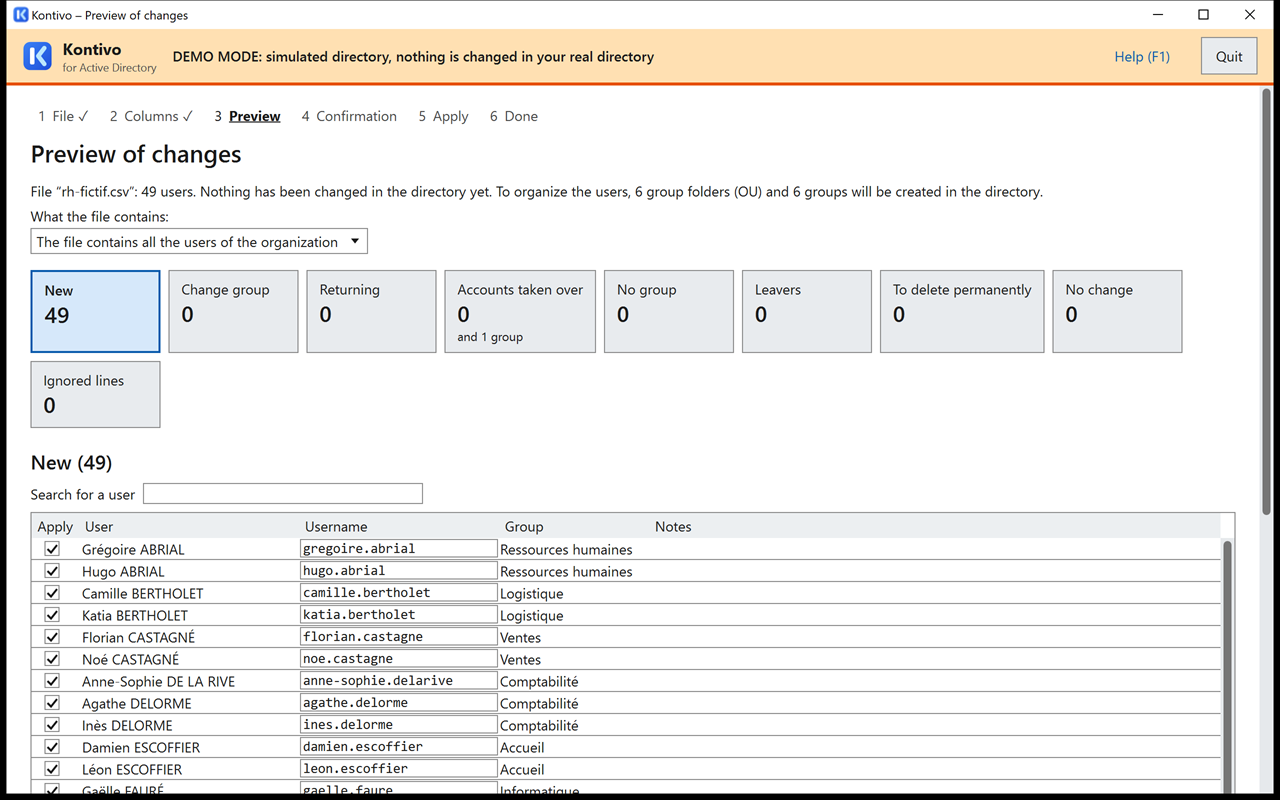
Accounts created with the username from your template (for example lea.martin), in the right folder and the right groups, with a temporary password.
Updates
Change of group, directory folder or display name: Kontivo follows the file.
Leavers and returns
Disabling, setting aside, delayed deletion; a person who comes back gets their account back.
Home folders
Creation of each new user's folder on the share, with its permissions.
Account sheets
Username and temporary password printed directly, on sheets or on label sheets.
Logs
Each run leaves a readable log: who, what, when.
Resume
An interrupted run resumes where it stopped, without doing anything twice.
Six languages
French, English, German, Spanish, Portuguese and Italian, light or dark theme.
Three steps, and nothing without your approval
Every import follows the same path. Kontivo changes nothing in the directory until you have seen and confirmed the preview.
The file
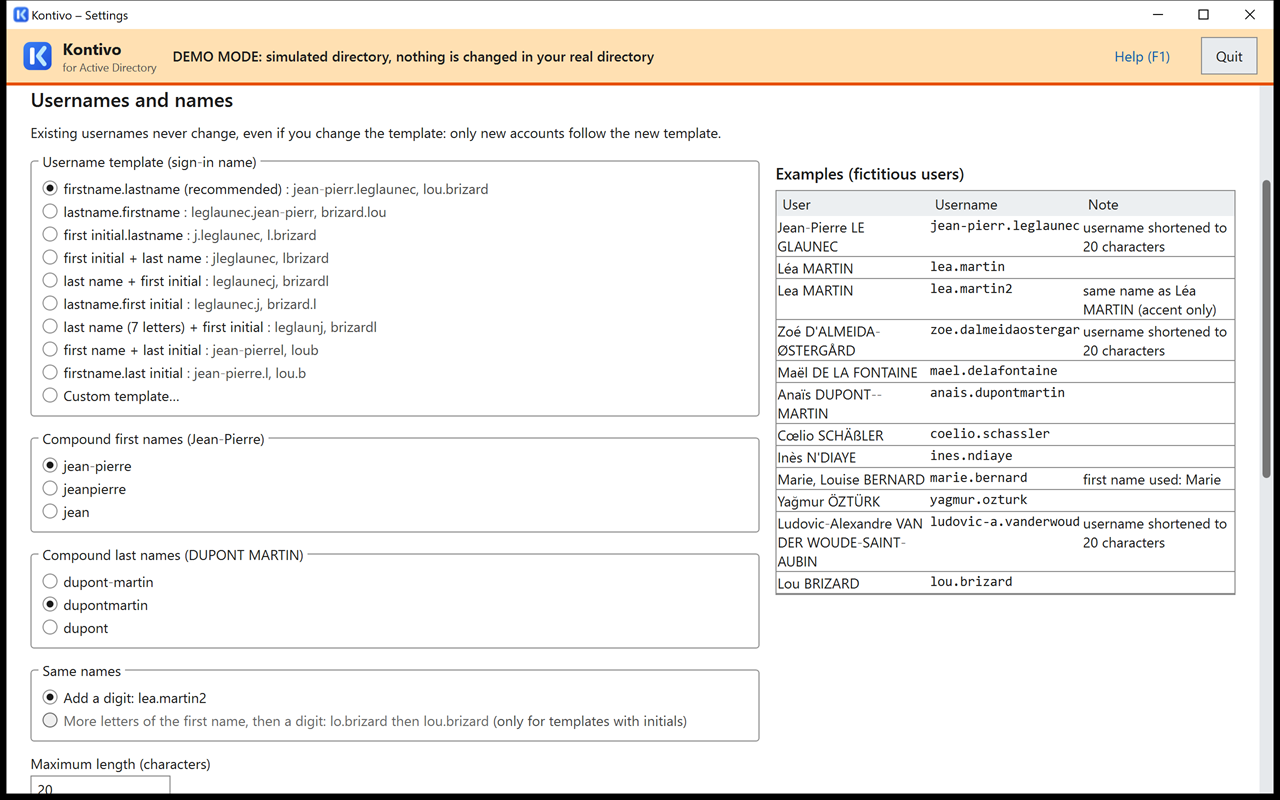
Drop in the export of your users: CSV, Excel or OpenDocument. Kontivo recognizes the columns on its own (last name, first name, group, ID) and asks you to check them.
The preview
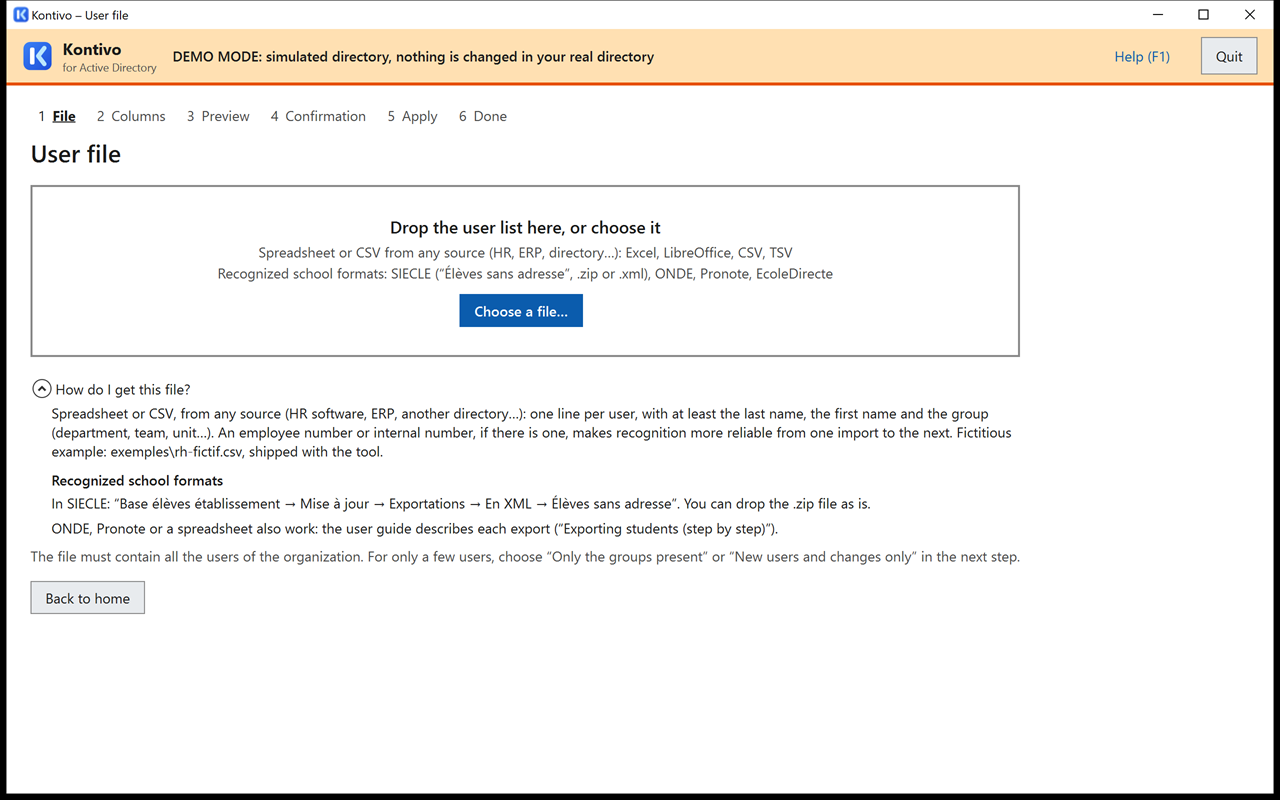
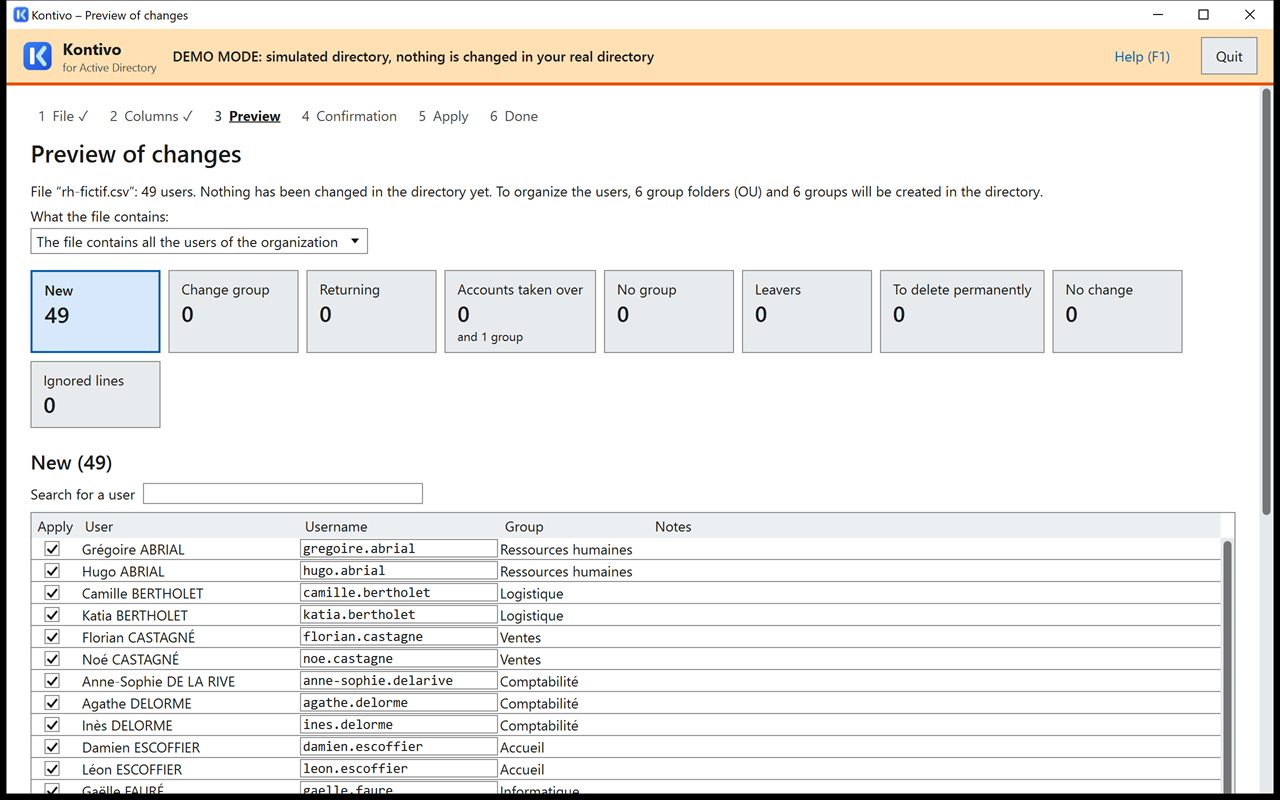
Kontivo compares the file with the directory and lists new accounts, group changes, leavers and returns. Doubtful cases are highlighted, to be checked.
The run
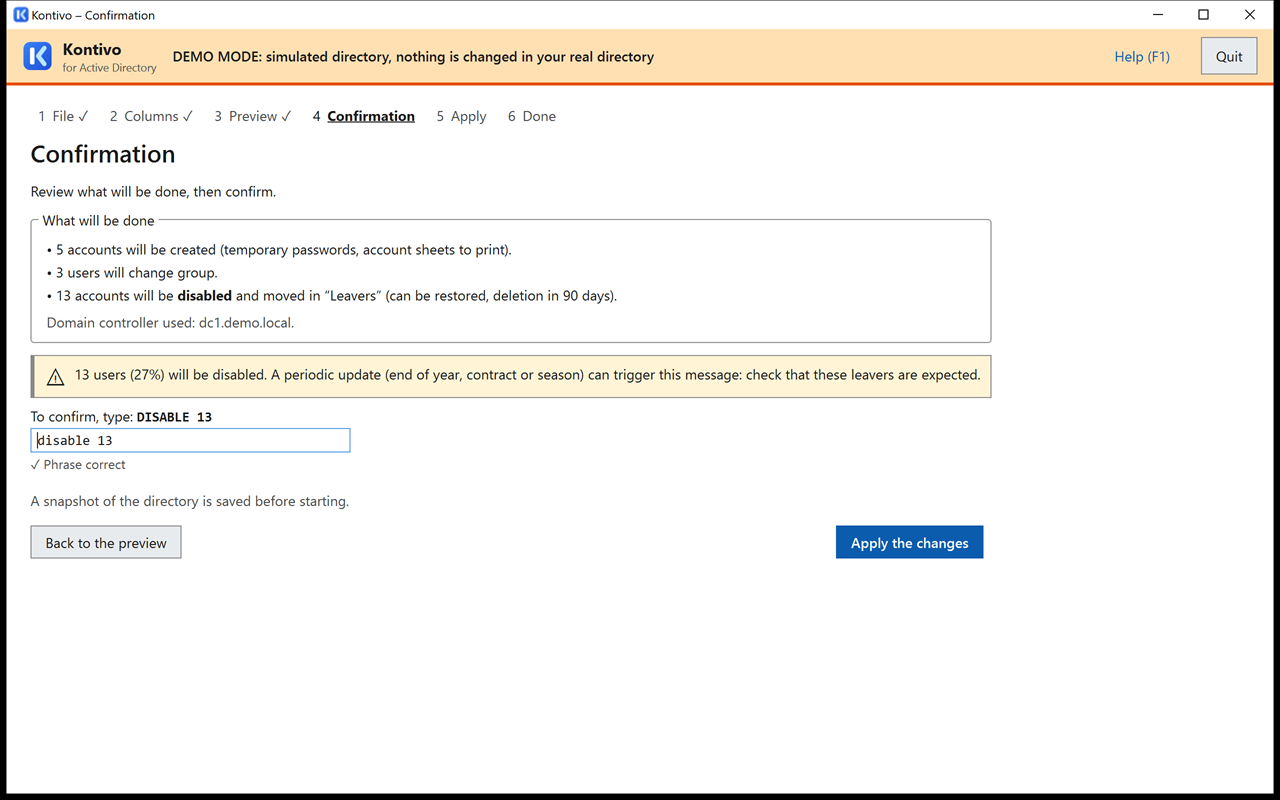
You confirm by typing a phrase that repeats the numbers (for example DISABLE 3 AND MOVE 12). Kontivo applies the changes in batches and keeps a log of each one.
Who is it for?
For any organization that manages its Active Directory accounts from a list of people, and wants to do it without scripts or retyping.
Businesses
New hires and leavers from the HR software export or a spreadsheet kept by the personnel department.
Local authorities
Staff, elected officials, contractors: one file, one preview, and the accounts follow.
Nonprofits
Volunteers and employees, with accounts that expire cleanly when they leave.
Educational institutions
Students and staff at the start of each school year, from school system exports recognized as they are.
Security first
Kontivo was designed for an organization's directory, where a mistake is costly.
- Everything stays on your network. The file is read on the computer where Kontivo runs; none of your users' data is sent anywhere else.
- A single outgoing connection, on click. The “Update the license” button downloads your license; never at startup, never in the background. Without Internet access, the license is loaded from a file.
- Passwords never written in plain text. Temporary passwords are printed on account sheets, encrypted for the Windows account that ran the import. Kontivo never asks you for a password to act in the directory.
- A delegated account. Kontivo acts with the Windows account that starts it; the user guide explains how to give it rights on your user folders only, and nothing else.
- Preview and confirmation phrases. Nothing is done without a preview, and major changes require typing a phrase that repeats their numbers.
- Reversible departures. An account missing from the file is first disabled and set aside; it is deleted only after the period you choose (90 days by default), and a departure can be undone in one click.
- Read-only without a license. Without a valid license, Kontivo shows the preview but changes nothing.
Requirements
- Windows 10 or 11, or Windows Server 2016 or later, with .NET Framework 4.8 (already present on these systems when up to date).
- An Active Directory domain and an account with delegated rights on the folders of the managed users.
- No installation: a single signed executable, to run from a protected folder.
Free trial
Demo mode works without a license and with no time limit, on a simulated directory: import your files, review the preview, apply, and see the result without touching your real directory.
Pricing
€49
per year per Active Directory domain
VAT not applicable, art. 293 B of the French General Tax Code.
- All features, with no limit on the number of accounts.
- One-year license, sent by email as soon as you pay.
- No automatic renewal: you get a reminder before the license ends and renew if you wish, without losing any days.
- Payment by card, or on invoice by bank transfer for public buyers.
Sales reserved for businesses and organizations.
Frequently asked questions
Our files have no student ID (INE) or employee number. Can Kontivo still use them?
Yes: the ID is optional. Without it, Kontivo recognizes a person by their name and date of birth when the file provides one, otherwise by their last name and first name. Because these matches are less reliable, Kontivo takes precautions: doubtful cases (same names, similar names) are flagged in the preview, to be checked; an account is never deleted directly, it is first disabled and set aside for the period you choose, and a departure can be undone in one click. If your file has an ID column (HR employee number, student number), Kontivo uses it first.
Is an Internet connection required?
No. Kontivo works offline. The license is a file (licence.json) sent by email and available for download from the customer area; it is loaded with the “Choose a license file…” button. The “Update the license” button is Kontivo's only connection to the Internet, and only when you click it.
What happens when the license expires?
The license is valid for one year; it is not renewed automatically and nothing is ever charged without you. A reminder is sent 30 days and then 7 days before it ends. If you renew early, the new license starts the day after the current one ends: you lose no days. Without renewal, the license remains valid for 14 days after it ends; after that, Kontivo switches to read-only: the preview is still available, but no changes are made in the directory. Your settings and logs are kept; a new license lifts read-only mode, without a restart.
We have several Active Directory domains.
One license covers one domain. For two domains, buy two licenses; they appear together in your customer area. If your domain changes, you can move the license to the new domain once per license period, from the customer area.
We are a public buyer. Can we pay on invoice?
Yes, if you are a public-law legal entity. Choose “On invoice” at purchase and enter your SIRET number: it is checked in the official French business register, and the invoice is made out to the name and address found there. The order is approved within one or two working days; the one-year license is sent to you on approval, and the invoice, payable by bank transfer within 30 days, can be submitted on Chorus Pro. Enter your commitment number or attach your purchase order.
What personal data do you process?
None of your users' data: it stays on your network. For sales, the license service keeps only the buyer (email address, name, organization, billing address) and their domains. The “Update the license” button sends only the domain and the license number. Payment is processed by Stripe. The details are in the privacy policy. Privacy policy (scolatools.com)
Can I try it on my real directory without risk?
Start with demo mode, on a simulated directory. Then, a first read-only pass on your directory shows the preview without changing anything; the user guide recommends doing the first real import on a test organizational unit.